Your team needs to verify officer activity in a certain pod.
Your supervisor is asking for an update on the facility's medication inventory.
A specific officer's rounds compliance needs to be reviewed.
Your administration wants a consolidated view of all late checks.
Do any of these scenarios sound familiar?
Being asked to pull and share a report once felt like a dreaded task. Traditionally, the process was manual, time-consuming, and unnecessarily complex. It meant locating a printer, loading paper, choosing the correct format, adjusting settings, and selecting the right color and orientation. But even once printed, the task wasn’t complete.
Next came preparing the scanner, cleaning the glass, carefully aligning the document, selecting compatible software, choosing scan settings, selecting the file type and resolution, previewing the scan, saving and naming the file, and finally placing it in a shared internal folder where others could easily access it.
And after all that hassle, the person who asked for the report ends up needing a different one…
This blog explores how Command Cloud has simplified the reporting process tenfold, and gone are the days of tumultuous report pulling and sharing.
Why is Reporting Essential?
In the high-stakes environment of a correctional facility, every decision impacts the safety of everyone within the walls. That’s why accountability and security are the foundation of a well-oiled facility. But to ensure that staff are accountable and all operations are secure, there needs to be a solution to verify that all actions are carried out correctly and in compliance.
When you need a resource for a sudden investigation, legal proceeding, or policy development, you need that report now, not in one hour or tomorrow (or later). That’s why Command Cloud's reporting capabilities were built to deliver real-time insights. Comprehensive documentation is available at an officer’s fingertips, empowering staff to pull reports that support operational efficiency and transparency within seconds.
Command Cloud delivers dynamic, seamless reporting through two powerful tools designed to give correctional staff insight into what is happening anywhere within the facility at any point:
- Mission Command: Command Cloud’s Cloud-native application that provides users with a common operating picture of all the data collected in Mobile Command XR. Accessible from desktops, it consolidates everything you need to know, see, and control.
- Operational Intelligence: This tool visualizes the data captured and stored in Command Cloud, bringing real-time clarity through diagnostic analytics. It provides upper management with a clearer, more impactful view of facility activity, allowing them to identify trends, recognize patterns, and make informed decisions.
So, what’s the difference between these two methods of reporting?
Reporting With Mission Command
When you open Mission Command, you’ll see navigation tabs displayed on the left-hand navigation bar. Each tab corresponds to a specific module within Mobile Command XR, the mobile inmate tracking system housed on the SPARTAN device.
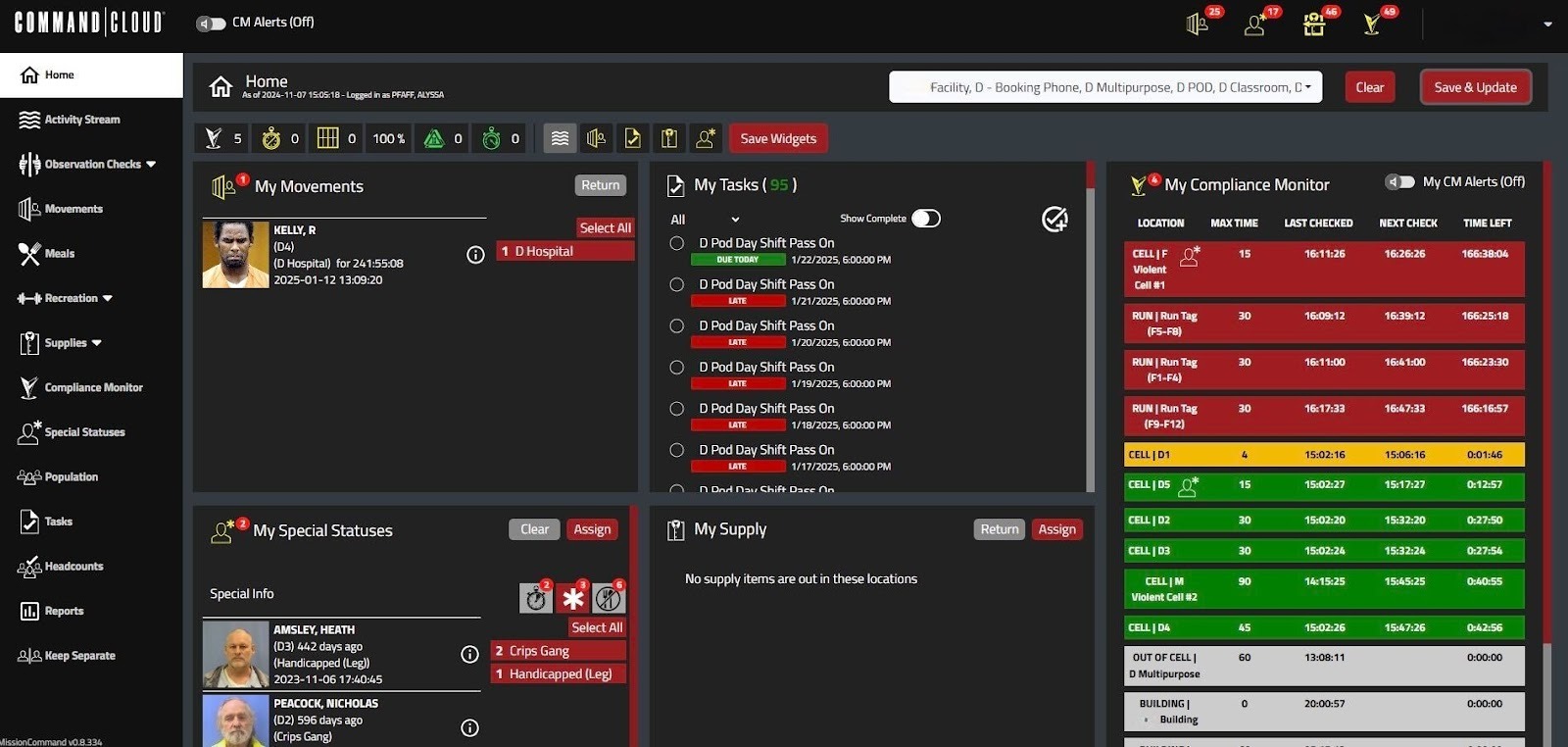
* Pictured: Mission Command Home page *
As officers use and sync their SPARTANs, data captured in Mobile Command XR is updated in real time within Mission Command. When each of these tabs is selected, it displays a dashboard that outlines all of the data captured. All tabs (except for Compliance Monitor) are dynamic, exportable reports, including:
- Activity Stream: Logs from all modules over the selected timeframe
- Observation Checks: Lists all observation checks, late checks, and compliance checks within the selected timeframe
- Movements: Breaks down all inmate movements, tracks inmates currently out of their cells, and monitors out-of-cell time and movement compliance
- Meals: Displays all current and historical meals, along with any meal restrictions
- Recreation: Shows inmates currently out for recreation, as well as provides past recreation logs
- Supplies: Outlines all issued returnable and dangerous items currently issued out to inmates, along with a log history of issued supplies
- Special Statuses: Highlights inmates assigned special statuses, including compliance considerations, special information, and meal restrictions
- Medication Manager: Centralizes all medication-related data, including orders, inventory, medical restrictions, and restriction history
- Population: Lists all inmates in custody, including their home and current locations
- Tasks: Outlines all active, scheduled, and archived tasks with details
- Headcounts: Breaks down active formal headcounts, completed formal headcounts, and completed informal headcounts
- Keep Separate: Displays all current and past assigned Keep Separates, as well as instances where Keep Separates were overridden (along with any justifications)
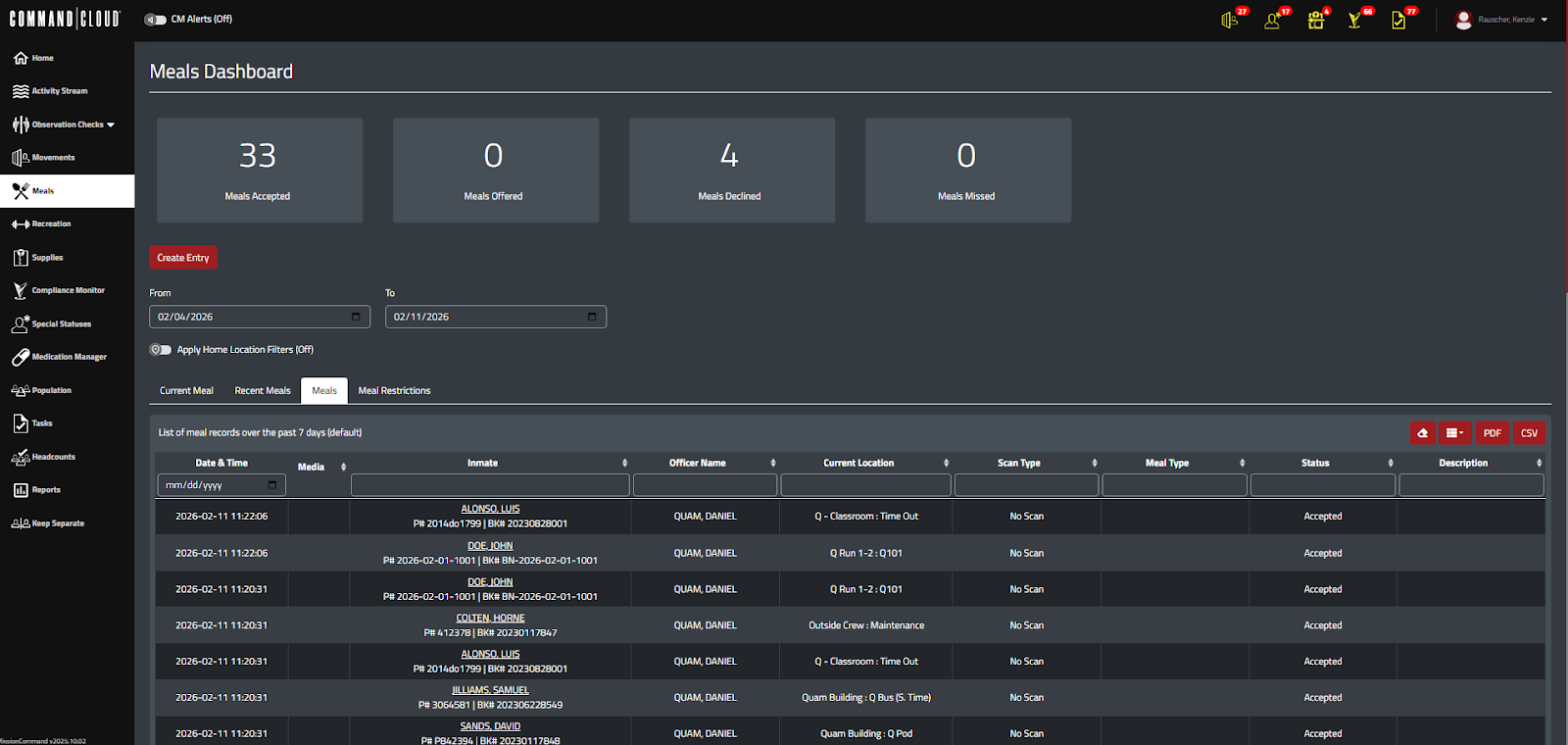
* Pictured: The Meals Dashboard, which consists of four unique tabs. The highlighted tab, Meals, displays an extensive history of ALL meals recorded in Command Cloud. With the filters, supervisors can set a specific timeframe, track which meals were accepted or declined, check for any discrepancies, and review any attached digital evidence for verification on any meal logged. *
And if you’d like a centralized hub to access this information and explore deeper insights, you can use the Reports tab in Mission Command. It includes twelve pre-built reports that highlight specific data captured within Command Cloud, making it easier to review and analyze your information in one place. The Reports tab is comprised of:
1. All Module Report: This pulls information captured from every module within Command Cloud, delivering a comprehensive overview of facility operations and activity.
2. Wristband Report: For facilities using RFID wristbands for inmate identification, this report helps staff quickly regenerate the required information and print a replacement wristband if the original is lost, broken, or damaged.
3. Compliance Late Check Report: This report compiles all instances of late checks based on selected filters, helping supervisors identify problem areas and take corrective action.
4. All Checks Report: This includes every location where timers were updated due to scans, movements, or JMS updates—including late and missed checks, offering valuable insight into overall officer compliance and performance.
5. ID Card Report: For facilities that use RFID cards for inmate identification, this report allows staff to quickly generate a replacement card with the necessary details if the original is lost or damaged.
6. Officer Stats Report: This summarizes officer performance over a specific date range, outlining all compliance checks and module activity in Mobile Command XR, providing a clear picture of officer activity and compliance across multiple areas.
7. Housing Assignment History Report: This report displays all housing changes within a specified date range, helping track inmate assignments and housing history to support accurate population management and accountability.
8. Medication Order History Report: This lists all medication orders for a selected time frame, allowing administrators to review records for inmates who are currently housed or have been released, supporting accurate documentation and enhancing defensibility against false claims.
9. Medication Inventory History Report: This shows all inventory adjustments over the selected date range.
10. Medication Administration Record Report: This report provides a comprehensive record of all medications administered within the facility and their corresponding actions over a specified date range, directly replacing paper MAR reports and improving efficiency, accuracy, and defensibility.
11. Time Tracking Report: This provides historical time-tracking data that breaks down each instance in which an inmate was offered out-of-cell time, including the type of activity (recreation, class, etc.), the amount of time used, the remaining time required, and additional relevant details.
12. Recreation Report: This shows historical data on accepted and declined recreation time, ensuring compliance with standards for out-of-cell time and recreation, and identifying inmates who have not met these requirements during the selected time period.
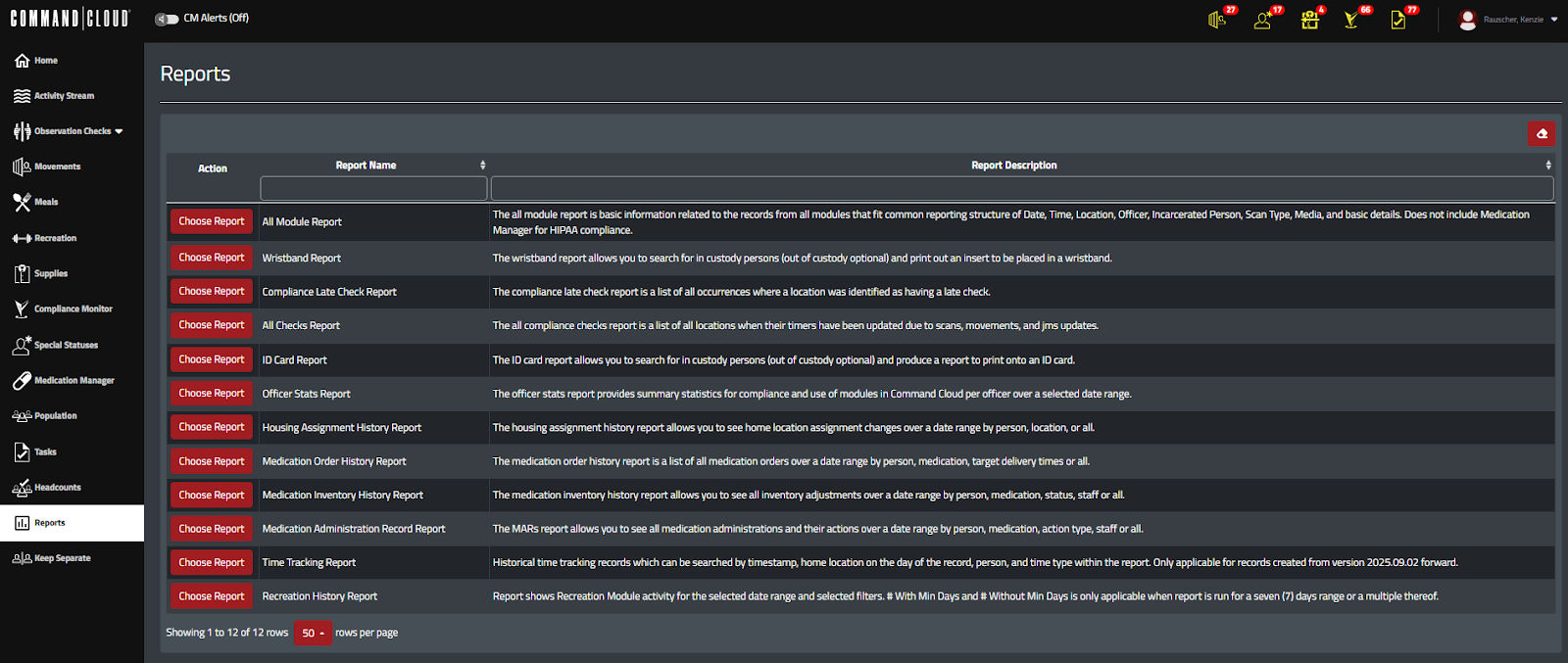
* Pictured: The Reports tab of Mission Command *
Each dashboard in Mission Command is highly customizable, allowing users to display as much or as little data as necessary. When generating reports, filters can be applied to narrow the results and focus only on the most relevant information. All reports can be exported in either PDF or CSV format and shared at the staff member’s discretion.
Reporting With Operational Intelligence
Once your data is captured with Command Cloud, the next step is turning it into actionable insight through interactive graphs and charts with Operational Intelligence (OI).
Operational Intelligence is essentially an extension of Mission Command’s reporting capabilities. All data collected and stored in Command Cloud integrates seamlessly into OI, providing more dynamic and visually engaging reports—in a very patriotic fashion.
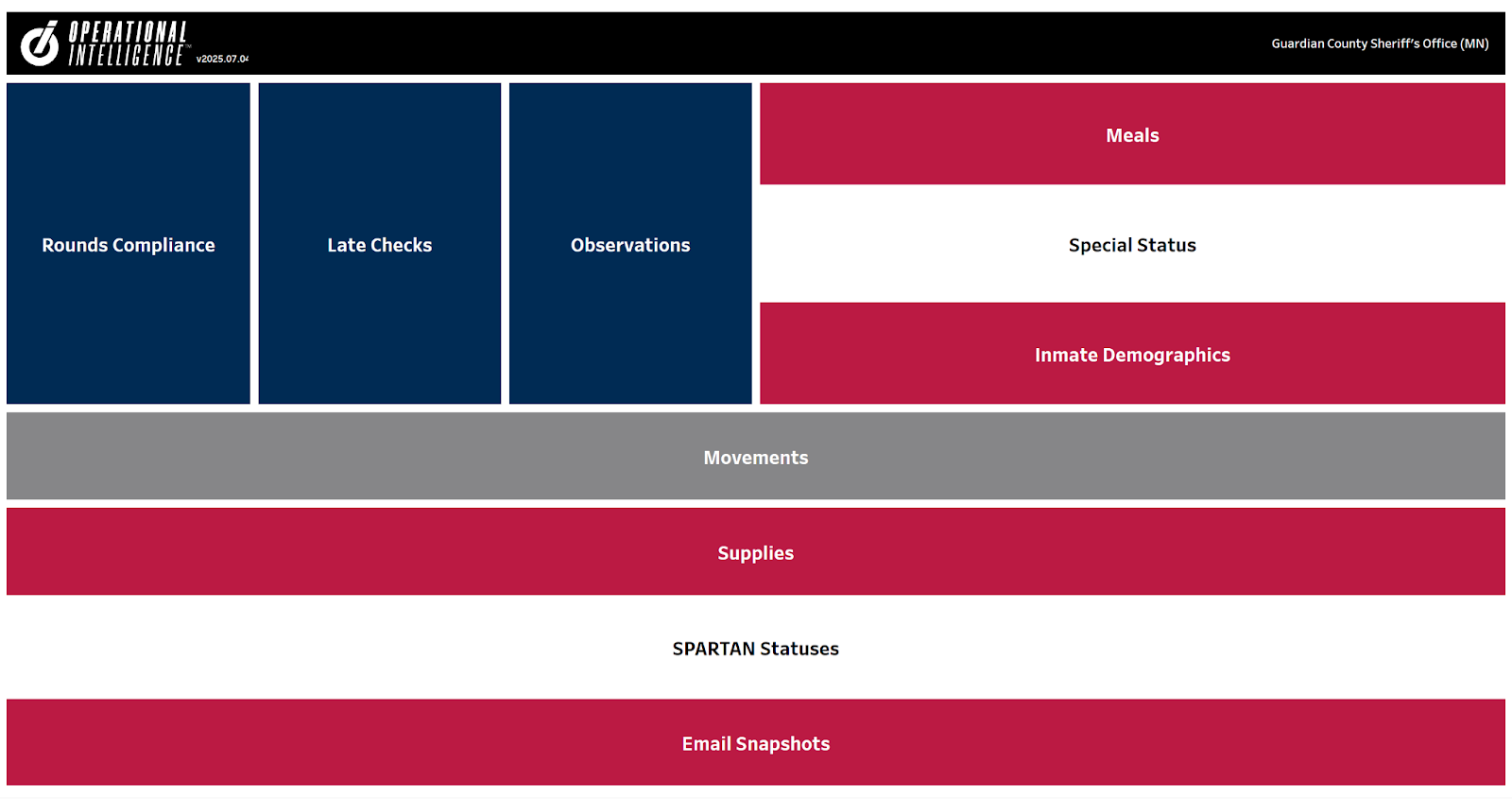
OI equips upper management with a clearer, more impactful view of officer performance and facility activity through its ten unique dashboards. By transforming raw data into visual insights, trends such as spikes or drops in performance become immediately apparent, making it easier to identify issues, recognize patterns, and take informed action. The ten dashboards include:
1. Rounds Compliance: Provides a detailed breakdown of all rounds—both on-time and late—offering deeper observations into officer performance and compliance.
2. Late Checks: Highlights all checks performed late, including officer justifications and supervisor review comments. It also uses graphs and charts to help supervisors and administrators quickly locate operational and performance patterns that contribute to late checks.
3. Observations: Shows all data captured during observation checks—including the specific observation made, their frequency, officer notes, location details, and inmate behaviors— transforming raw observation data into actionable insights that help staff identify early warning signs and address potential issues before they escalate.
4. Meals: Provides a comprehensive view of inmate meal activity, tracking the time since each inmate’s last accepted meal, dietary restrictions, and instances where meals have been declined. All this data helps identify patterns such as repeated meal refusals and visualizes meal requirements across the facility, helping staff notice possible health concerns and accommodate special dietary restrictions.
5. Special Status: Displays all special statuses and breaks them down by status type, inmate, and location. This helps boost officer awareness and accountability while ensuring specific inmate needs are being met.
6. Inmate Demographics: Compiles inmate information (typically entered into Command Cloud from JMS or manual entry) and breaks down the data into charts and graphs outlining gender and race ratios, facility age distribution, days in custody, and even upcoming inmate birthdays, giving deeper insight into the inmate population.
7. Movements: Provides a detailed overview of all facility movements, including both inmates and officers, and is organized into three main tabs: Movements, Recreation Movements, and Recreation Compliance. Immediate access to reports that highlight compliance is invaluable for maintaining operational accountability and meeting regulatory compliance.
8. Supplies: Tracks all supply items assigned to inmates, ensuring that returnable or potentially dangerous items are properly returned, and that essential materials (e.g., toilet paper, feminine hygiene products, and other hygiene supplies) are distributed as needed.
9. SPARTAN Statuses: Lists all facility-owned devices, including officer names, timestamps, assigned officers, and last sync times. This helps locate missing devices by identifying who last used them and when they were last active.
10. Email Snapshots: Offers quick access to key reports optimized for email delivery, giving users a concise overview of essential metrics ideal for daily summaries and updates. It features three main tabs that organize the data into easy-to-digest reports, including: Previous Day Compliance, Last Seven Days of Compliance, and Weekly Summary.
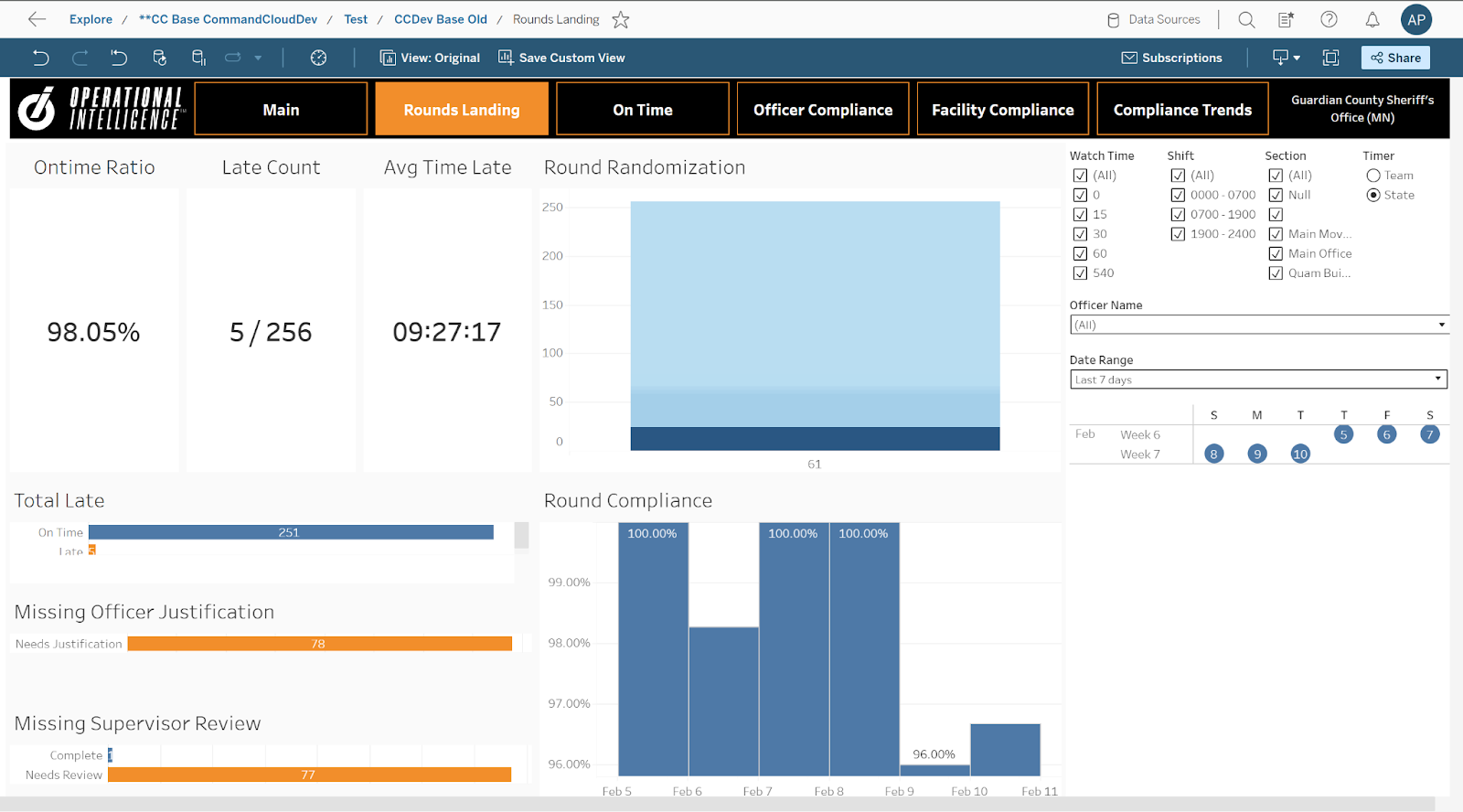
* Pictured: The Rounds Landing tab within the Rounds Compliance dashboard, breaking down all rounds—both on-time and late—offering deeper observations into officer performance and compliance. *
Each OI dashboard features dynamic, data-specific filters that allow users to refine information to the exact level of detail they need—whether broad overviews or granular analysis. By moving beyond static reports and delivering real-time visibility into performance metrics, OI enables supervisors to quickly uncover actionable insights, identify strengths and weaknesses, and recognize operational trends at a glance.
“As a Jail Administrator, I can pull reports to look at my percentages and confidently know that my officers are doing their job of keeping inmates safe by checking on them so often. I can keep up with my inmate movement a lot easier now by looking in the system and seeing where my work crews are or who's out for court. I can keep up with who's eating and who’s refused. This system is a lifesaver.”
- Keysha Phelps | Jail Administrator | Sequoyah County Sheriff's Office, Oklahoma
By unifying performance, compliance, and operational data into a single, intuitive, and visually engaging platform, OI empowers teams to proactively enhance safety and operational consistency, rather than simply reacting to issues as they arise.
Yet, extracting the data and uncovering insights is only part of the equation. The real impact comes from sharing the results with your team to collectively make informed, data-driven decisions.
To simplify this process, OI reports can be automatically emailed to the email address(es) linked to your account. After selecting the day(s) of the week, time, frequency, subject, and formatting you want to receive with your OI reporting subscription, the recipient will receive all scheduled reports directly in their inbox and can easily forward the information to any additional stakeholders as necessary.
Take it from Captain Gray of Rockwall County, Texas, as he explains how Operational Intelligence completely revolutionized the way he manages his jail and his belief that any agency not leveraging OI is immediately at a disadvantage (his words, not ours).
In today’s correctional environment, speed, accuracy, and accountability are non-negotiable. Command Cloud replaces outdated, manual methods of printing and scanning with a modernized approach that puts the officer experience at the forefront: streamlined efficiency.
Through Mission Command, officers and supervisors gain immediate access to real-time, exportable reports that provide a comprehensive view of facility operations. With Operational Intelligence, staff transform data into actionable insights through interactive dashboards and automated email delivery, ensuring the right information reaches the right people at the right time.
Command Cloud ensures reporting is no longer a bottleneck—but a strategic advantage. By centralizing data, visualizing trends, and simplifying report sharing, Command Cloud helps corrections professionals operate more efficiently, maintain compliance, and proactively enhance safety across the facility.
%20Command%20Cloud%208%20(1).jpg)