

In corrections, there is no room for “good enough” when safety and security are on the line. A single misplaced decimal point on a paper log or one missed headcount doesn't just disrupt operations—it creates a massive hole in your facility’s legal defensibility. For administrators, the ultimate test isn’t just whether your team is capturing data, but whether that data holds up under the scrutiny of a state audit or high-stakes litigation.
As facility mandates evolve and staffing challenges persist, traditional manual methods are increasingly becoming a liability. Modernizing your operations isn’t just about “going digital”; it’s about empowering your team with a fail-safe system that ensures compliance and provides real-time oversight, especially during critical tasks like conducting inmate headcounts.
In this blog, we’ll break down how streamlining the headcount process with Command Cloud eliminates the risks associated with manual tracking, ultimately transforming your greatest operational risk into your strongest defensible asset.
What are the Different Types of Headcounts?
Conducting inmate headcounts seems pretty straightforward—it’s just accounting for every inmate, right? Yes, but there is more to it.
Correctional facilities rely on a strategic mix of headcount protocols to maintain safety and accountability. While informal, formal, and two-person formal headcounts all share the same objective, they vary in complexity, verification depth, and the level of data capture required.
Informal Headcount
An informal headcount is a quick, on-the-spot count conducted at the officer’s discretion. This process involves simply physically counting inmates in a given area and verifying that the number of inmates matches the roster.
Though less detailed than a formal count, these frequent counts play an important role in maintaining continuous awareness of inmate movement. Informal headcounts allow officers to quickly confirm that no one is missing or out of place, helping to prevent potential issues from escalating into larger security breaches.
Formal Headcount
A formal headcount is a cornerstone of correctional security, offering far greater detail and structure than its informal counterpart. During this process, officers not only physically count each inmate but also verify their identity by visually matching their physical presence to official identification, such as an ID card or wristband.
Unlike the ad hoc nature of informal headcounts, formal headcounts follow a predetermined schedule or frequency—often mandated by policy to occur at specific intervals, like shift changes or overnight. This rigorous method provides more than just order; it produces a timestamped, documented record confirming that every inmate is accounted for exactly where they should be, minimizing the risk of misidentification and upholding officer accountability.
Two-Person Formal Headcount
A two-person formal headcount is similar to a standard formal headcount but introduces a second layer of verification: two officers conducting independent headcounts. This practice is rapidly becoming the national standard, as state mandates increasingly require dual verification to ensure absolute accuracy. The logic is simple—two officers provide twice the defensibility, twice the error reduction, twice the accountability, and an exponentially more secure environment for everyone within the facility.

While these three headcount methods are the bedrock of maintaining total awareness and security, the traditional way of logging them—manual tallying with pen and paper—creates a bottleneck in communication and a high risk of data entry errors. To move from manual guesswork to modernized accountability, you need a system that supports these protocols in real time.
This is where Command Cloud transforms the process.
By digitizing and centralizing headcount workflows, Command Cloud turns the headcount process into a real-time operational asset. By unifying your facility’s tools into a single, seamless operating picture, you ensure every count is captured with digital precision, empowering your team to lead with total confidence and control.
What are Command Cloud’s Headcount Tools?
Command Cloud has two key components for managing a successful headcount: the Headcount module and the Headcount dashboard. Together, these tools work in tandem to create a seamless process—from alerting staff to initiate counts to storing and accessing data for future needs (such as last-minute accreditation reviews).
What is the Headcount Module?

The Headcount module operates within Mobile Command XR, Command Cloud’s mobile inmate tracking solution. Using this module, officers can document headcounts in real time while also viewing comprehensive lists outlining which inmates should be assigned to a specific area.
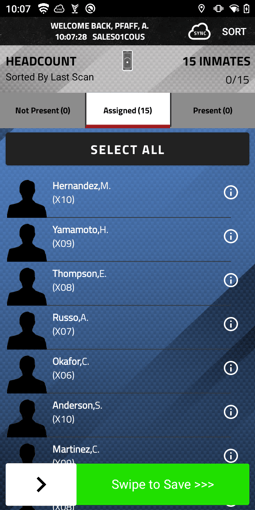
Because the module is fully integrated with Command Cloud, inmate movements are automatically updated across the system. If an inmate is moved to medical, recreation, court, or any other location, that change is visible to staff conducting the count via their Mobile Command XR screen. If an inmate is not where they are expected to be, officers can quickly mark them as unaccounted for and, if necessary, add a justification that clarifies their absence.

Since Mobile Command XR is housed on SPARTAN, staff can access the Headcount module straight from their device, on the go. This gives staff real-time awareness and enables them to complete headcounts more accurately at the point of responsibility from anywhere within the facility.
What is the Headcount Dashboard?
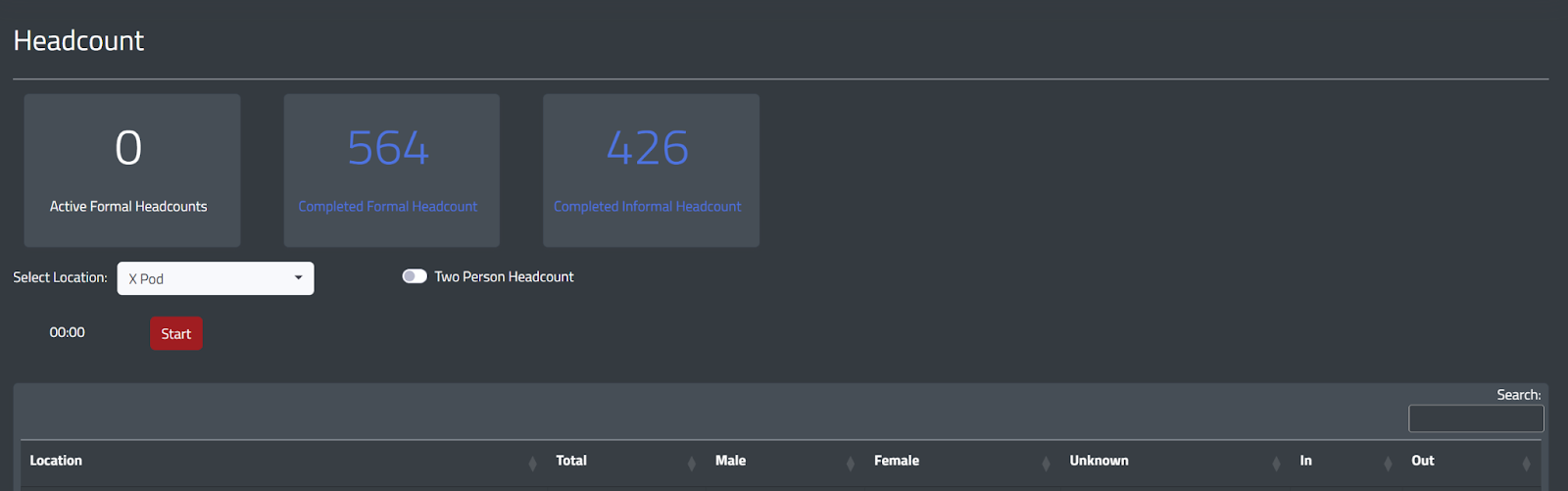
The Headcount dashboard, native to Command Cloud’s Mission Command platform, enables users to start formal headcounts, monitor the progress of active headcounts, and review and export data from both formal and informal headcounts.
By navigating to Headcounts from the left-hand navigation bar in Mission Command, users get a clear overview of all headcount entries, including the total number of inmates counted, their gender breakdown (male, female, unknown), and whether they are marked as In or Out of their cell.
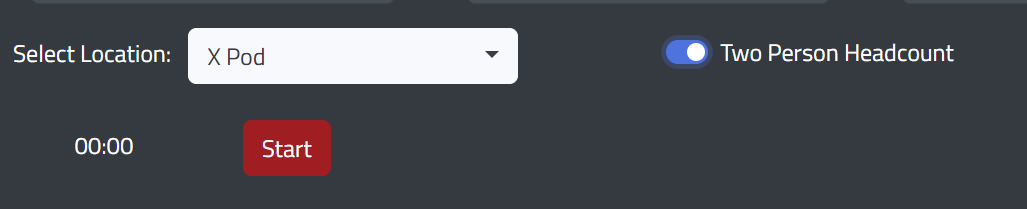
At the top of the dashboard, three clickable boxes allow users to toggle between different reports, including Active Formal Headcount, Completed Formal Headcount, and Completed Informal Headcount. There is also a toggle to support Two-Person Formal Headcounts, which can be turned on before starting a headcount simply by clicking it.
The Adams County Jail, Indiana, for example, used paper logs and outdated systems, leaving staff vulnerable to liability and compromised inmate safety. Accountability was a constant challenge—until the facility transitioned to Command Cloud. The success story below reveals how digital transformation redefined their daily operations. By empowering officers with real-time headcount capabilities and dashboard oversight, Adams County bridged the gap between operational risk and total control, ultimately reaching a remarkable 99% compliance.
How Can I Use Command Cloud to Conduct Headcounts?
By leveraging both Command Cloud’s Headcount module and dashboard, officers gain a unified platform that streamlines the headcount process from any corner of the facility. While Command Cloud provides a consistent standard for documentation, the digital workflows are tailored to meet the unique requirements of both informal and formal protocols.
Streamlining the Formal Headcount Process
When it’s time to conduct a formal headcount (or a two-person formal headcount), users navigate to the Headcount dashboard and select their assigned location(s) from the dropdown menu. If the facility requires dual verification, users must activate the Two-Person Headcount toggle. Otherwise, users press the red Start button.
Immediately, the interface shifts to a comprehensive real-time view, splitting the screen between the Unaccounted Inmates List and the Headcount Dashboard.
- The Unaccounted Inmates List highlights each inmate’s name, gender, current location, and home location, enabling staff to quickly identify discrepancies.
- The Headcount dashboard displays information for the location(s) where the headcount is active, including the location, total number of inmates, gender breakdown, the number of inmates who are in and out of their cells, how many have been accounted for, the types of scans completed, and the last updated time.
If you’re running a two-person count, the dashboard displays two "Accounted" columns, one for each officer. This ensures that no inmate is considered "cleared" until both officers have independently verified their presence.
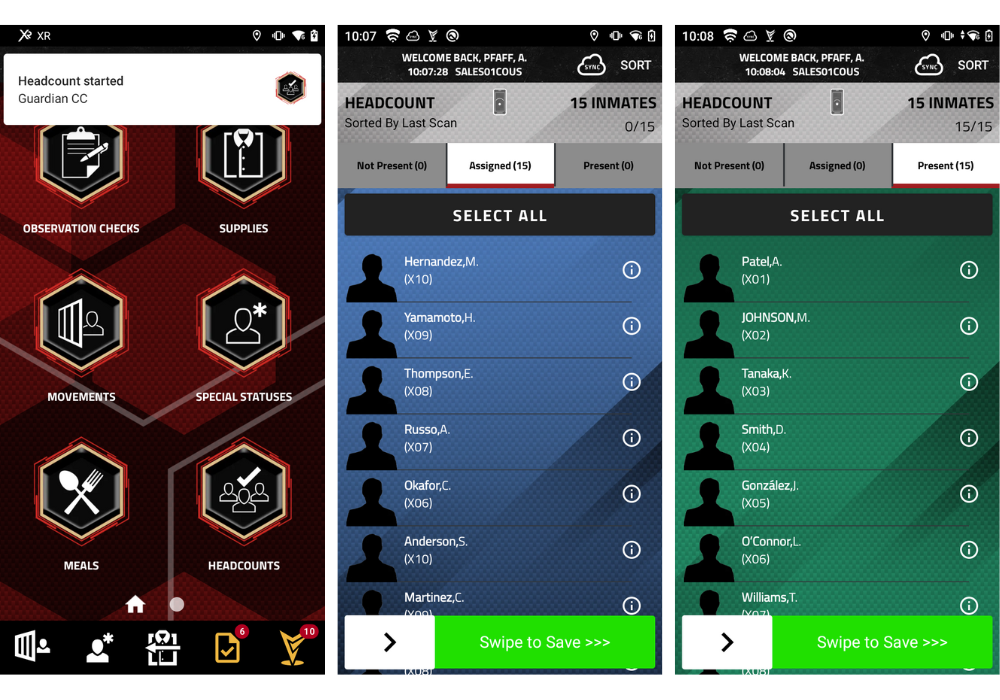
The moment the red Start button is pressed in Mission Command, the system pushes a live alert directly to Mobile Command XR, which is housed on each officer’s SPARTAN. From there, the workflow is fast and fluid: staff can either scan the location RFID Tag or manually pull the specific roster for that area to view the list of inmates who should be present. Officers can then either scan the inmate IDs for automatic verification or manually swipe right to mark them as Present.
If an inmate is not where they’re expected to be, the officer can swipe left to mark them Not Present and immediately reassign them to their current location—whether that’s medical, court, or recreation. To maintain a complete audit trail, the officer can use talk-to-text or type a quick justification note explaining the absence. Once the officer swipes to save, all data syncs instantly with Mission Command, allowing the administrator to review the final numbers and officially finish the headcount with total confidence in the data.
If, for any reason, a formal headcount was started by mistake or the Two-Person Headcount feature was not toggled on yet, users can press the Cancel button in Mission Command to end the headcount early. Cancelled headcounts will still appear in the Completed Formal Headcount tab, but will be marked as Cancelled under the “Status” column.
Additionally, if a headcount is finished but not every inmate is accounted for, the user must enter a justification for each unaccounted inmate explaining why they were not present. For example, if an inmate is in court during a headcount, the user will need to note that as the justification.

Streamlining the Informal Headcount Process
Conducting an informal headcount, by comparison, is a much more straightforward task. Officers begin by either scanning a location RFID Tag with their SPARTAN or manually filtering to the location in the Headcount module in Mobile Command XR; both options display the full list of inmates assigned to that area.
Officers can then either visually confirm each inmate listed and swipe right to mark them as Present or, if required, scan each inmate’s ID. Any inmate who is not present must be marked as Not Present, and officers are required to move them by selecting the appropriate location and providing a justification to clarify why they are not present.
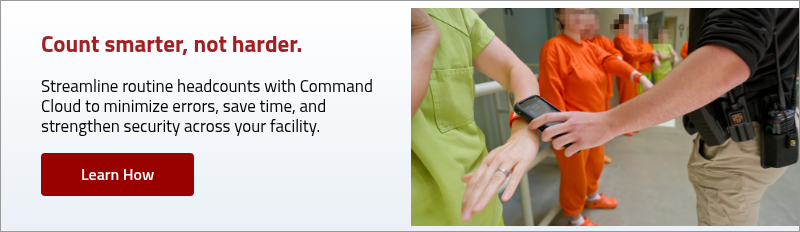
“The headcount process is so much easier now that we scan wristbands instead of making inmates stand outside their cells until we count everyone with pen and paper. I love having the GUARDIAN RFID system, it has been a lifesaver."
- Keysha Phelps, Jail Admin at Sequoyah County Sheriff's Office, OK
Can I View Previously Recorded Headcounts?
All headcounts recorded in Command Cloud are stored within Mission Command. These exportable reports highlight critical information captured during each headcount. To access them, select one of the three boxes at the top of the Headcount dashboard:
- Active Formal Headcount: Displays all formal headcounts currently in progress within the facility, providing a real-time view of who is and isn’t accounted for.
- Completed Formal Headcount: Shows all formal headcounts that have been completed within the selected timeframe.
- Completed Informal Headcount: Shows all informal headcounts that have been completed within the selected timeframe.
In both Completed Formal and Informal Headcounts dashboards, users can select the red View box to open a comprehensive overview of the selected headcount. This includes information such as inmate name, location, accounted time, the officer who completed the headcount, and other critical details. All of these reports can be downloaded from the dashboard in either PDF or CSV format and distributed as necessary.
Why Modernization is a Liability Necessity
While the primary goal of any headcount is safety, the primary goal of a modernized process is defensibility. Relying on manual entries and paper logs creates a gap where a simple clerical error can become a catastrophic legal liability. Transitioning to a modernized, data-driven approach, such as Command Cloud, fundamentally strengthens your facility’s accountability by:
- Eliminating human error: Manual tallies are susceptible to fatigue, distraction, and the inherent risks of "pencil-whipping." By utilizing RFID scanning for inmate identification verification, Command Cloud enforces accuracy at the point of responsibility.
- Creating a steadfast audit trail: Compliance isn't just about doing the work; it's about proving the work was done. Command Cloud replaces illegible paper logs with timestamped, unalterable digital records.
- Enhancing real-time oversight: Liability often lives in the "blind spots" of a facility. Mission Command’s Headcount dashboard provides an immediate, overarching view of all activity, allowing leadership to intervene proactively rather than reacting to a crisis after the fact.

Within any jail, the distance between a secure, controlled environment and a detrimental lawsuit can all boil down to the accuracy of a single headcount record. Relying on manual processes and paper logs in an increasingly digital world isn't just inefficient—it’s an unnecessary risk.
By integrating these modernized processes, facilities move beyond basic accounting and into a state of maximum compliance, where data serves as both a tool for safety and a shield against liability. This shift enables teams to operate proactively, transforming data into a safety net rather than a reactive paper trail.
Whether it’s a discretionary informal check or a state-mandated dual-verification count, having real-time data at your fingertips turns a high-stakes task into a streamlined, defensible asset. The transition from paper to digital is no longer a luxury; it is the new benchmark for facility compliance.

.jpg)