.jpg)
Inmate medical care is one of the most essential, and often most scrutinized, aspects of the corrections industry. Many inmates enter custody with pre-existing physical health needs, mental health conditions, or substance use disorders that require medication and attention. Correctional professionals play a critical role in ensuring these inmates receive proper medical care and access to necessary resources.
However, without the right tools, tracking, administering, and documenting inmate medications can quickly become complex and time-consuming. So, how can correctional agencies improve their inmate medication management to ensure accuracy, efficiency, and compliance?
In this article, we’ll explore how to streamline medication tracking, administration, and documentation, helping facilities deliver safer and more efficient inmate care.
Why is it Important to Properly Manage Inmate Medication?
Efficient and accurate inmate medication tracking, administration, and documentation are not just operational necessities—they are essential to protecting inmate healthcare rights, reducing agency liability, and promoting responsible inmate care.
Without reliable tools to assign, track, and administer medications, facilities risk errors that compromise both inmate rights and operational compliance. Common risks of ineffective medication management include:
- Missed or incorrect doses: Without accurate tracking tools, staff may administer the wrong medication, the wrong dose, or miss doses entirely.
- Risks to inmate health: Medication errors can lead to serious complications or exacerbate existing conditions.
- Misuse and safety threats: High-risk medications such as opioids, sedatives, and psychotropics can be diverted or misused, endangering staff and inmates.
- Legal and compliance issues: Improper medication administration can result in lawsuits, regulatory penalties, and violations of healthcare standards.
- Incomplete medical records: Poor documentation can cause improper care, missed diagnoses, and complications during transfers or reentry.
To ensure safe, accurate, and efficient medication management from assignment through administration, correctional facilities need reliable, purpose-built tools. Medication Manager for Command Cloud streamlines the entire medication administration process—helping facilities overcome the challenges of outdated or inefficient systems while improving safety, compliance, and care quality.
What is Medication Manager?
Medication Manager is a secure, cloud-based solution designed to streamline and safeguard medication management in correctional facilities. Built specifically for the unique challenges of the industry, it empowers corrections staff to order, administer, and track inmate medications with accuracy, accountability, and compliance.
Medication Manager governs the entire inmate medication lifecycle—from prescription to administration—directly within the Command Cloud officer experience platform. Staff can create and manage medication orders electronically, reducing transcription errors and ensuring timely delivery. At the point of care, medications are verified and documented with built-in safeguards to confirm patient identity, dosage, and timing.
Each stage of the process is supported by digital logs and electronic signatures from either inmates or administrators, creating a verifiable chain of custody for every dose. Robust reporting tools provide facility leadership with actionable insights to monitor trends, identify compliance issues, and prepare for audits or inspections.
Medication Manager consists of two integrated tools: Mission Command’s Medication Manager dashboard and the Mobile Command XR Medication Manager module.
Medication Manager Dashboard
Located in Mission Command, the Medication Manager dashboard offers a comprehensive view of all medication-related activities across the facility, serving as the central location for managing medications and orders.
The dashboard is organized into four main tabs, each with its own purpose, data, and functionality:
1. Medication Orders
At the top of the dashboard, the Medication Orders tab displays four summary boxes that provide key metrics: the total number of medication orders, the number of due orders, the number of late orders, and the next order due. Directly underneath those boxes are three actionable red boxes:
- CREATE MEDICATION ORDER: Use this to create a new medication order and define how frequently the inmate receives the medication.
- CREATE A MED PASS: This is the web version of the action traditionally performed in Mobile Command XR, used to document when prescribed medications are administered.
- CREATE AN OTC PASS: Another action traditionally performed in Mobile Command XR, this button allows documentation when over-the-counter (OTC) medications are administered to inmates.
Below this is a table that provides detailed information for each active medication order, including inmate, location, medication, quantity, and more. Each column can be sorted to help you display the specific information most relevant to your needs. To see a detailed breakdown for a specific order, click the VIEW button in the Action column.
2. Medication Inventory
The Medication Inventory tab displays all active medications currently in use at the facility, along with their quantities, and allows users to make inventory adjustments.
At the top of the dashboard, four dynamic summary boxes provide a snapshot of inventory levels, medications that are out of stock, those that are below zero, and the number of inactive inventories.
Below the summary boxes is a red CREATE INVENTORY ADJUSTMENT button, which allows you to update or correct inventory counts as needed.
The table underneath shows each medication in the facility’s inventory. The columns are sortable and include: action (where you can edit or deactivate a medication), medication, ownership, inmate, and count.
3. Medical Restrictions
The Medical Restrictions tab lists all inmate medical-related restrictions, such as medication allergies, medication abuse history, etc.
To add a new restriction, click ASSIGN MEDICAL RESTRICTION. You then specify the inmate’s location, name, the medical restriction, and any additional notes, then click SAVE.
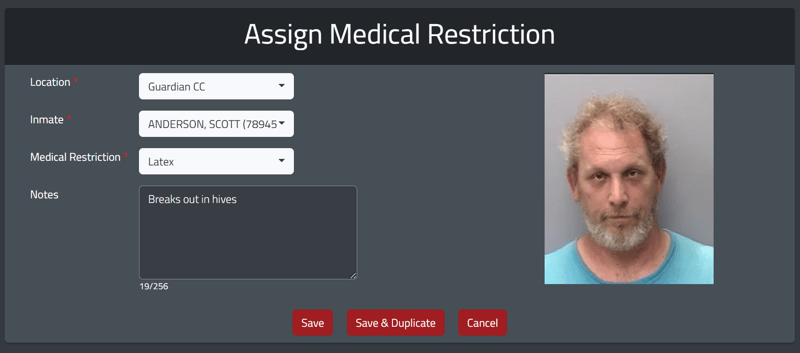
The Medical Restrictions tab features a table that displays the inmate’s name, restriction, notes, start date, duration, and assigning staff. Users can sort the table by any of these columns to organize the data as needed.
4. Medical Restrictions History
The Medical Restrictions History tab provides users with a comprehensive list of all cleared medical restrictions that are no longer active.
At the top of this tab, you will see a summary box highlighting the number of medical restrictions and the ability to adjust the data. Below that is a table identifying the assigned inmate, the type of medical restriction, notes, the applicable dates, the duration of the restriction, and the staff members who initiated and concluded the restriction.
Is this data exportable?
Yes. Each tab in the Medication Manager dashboard functions as an exportable report. There are also specific reports available in the Reports page on the left side command pillar in Mission Command, including:
- Medication Order History: This report is a list of all medication orders over a specified date range. This report can be filtered by Start Date, End Date, Inmate, Medication, and Admin Times. It can also be toggled to show inmates who have already been released.
- Medication Inventory History: This report shows all inventory adjustments over the selected date range. This report is filterable by Start Date, End Date, Medication, Inventory Ownership Type, Status, Staff, and can be toggled to show inactive staff.
- Medication Administration Record: The MAR report allows you to see all medication administration actions over a date range. This report can be filtered by Start Date, End Date, Inmate, Medication, Action Type, and Staff. It can also be toggled to include both inactive staff and released inmates.
All reports can be downloaded as PDF or CSV files and shared.
Medication Manager Module
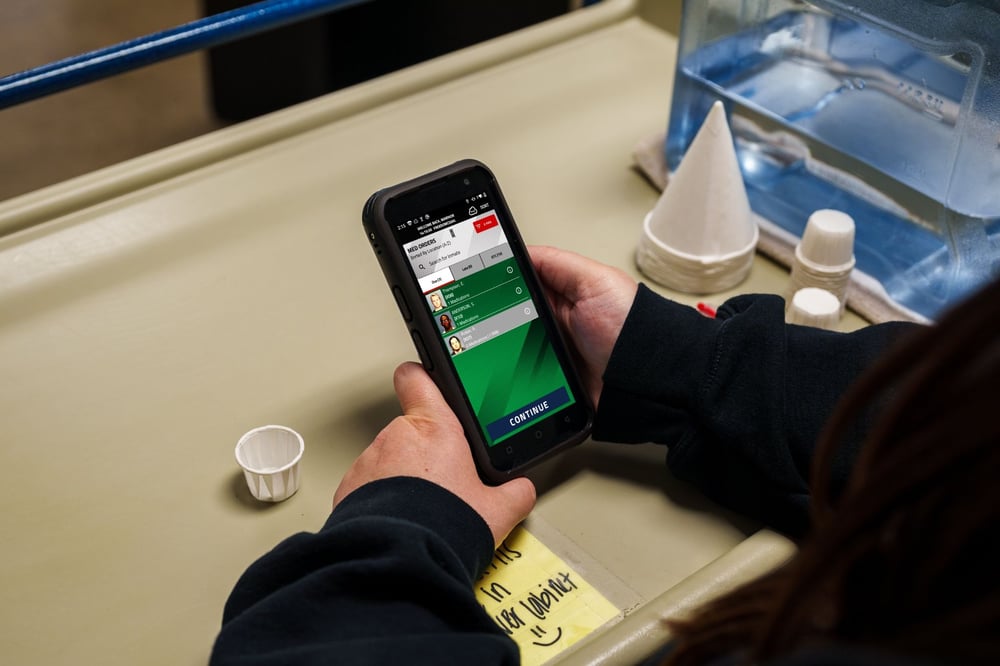
From the Medication Manager module in Mobile Command XR, corrections staff can easily view upcoming medication passes and manage medication administration. This enables staff to track and document every med pass at the point of responsibility. The module can be filtered by the user’s location, allowing corrections staff to focus only on the inmates under their care.
The module is organized into three main tabs: Due Med Orders, Late Med Orders, and OTC.
Due Med Orders
The Due tab allows corrections professionals to view all active medications that are still within their allowable administration window—before they become late or missed. The administration window is determined by the target and delivery times set when the medication order is created.
In the Due tab, you select the desired inmate, press Continue, act on each medication, and press Save. If the medication was late, unable to be passed, or given too soon after the last pass, you must provide a justification. If a signature is required, the user will be prompted to obtain one from the inmate or provide their own, depending on the facility's policy.
Late Med Orders
The Late tab only displays active med orders that have surpassed the allowable administration window. These medications remain in the Late tab until the next scheduled medication pass is due to begin; then they become a missed medication record.
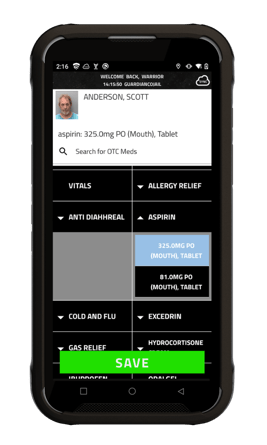
In the Late tab, you can still pass meds by selecting the desired inmate, pressing Continue, acting on each medication, and pressing Save. If a signature is required, the user will be prompted to obtain one from the inmate or provide their own, depending on the facility’s policy.
Over-the-Counter (OTC) Med Orders
Within the Medication Manager module, users can switch to the OTC tab to document over-the-counter medication passes. After selecting the intended inmate and the Continue button, the staff member chooses from preset WordBlocks based on the facility’s OTC medication inventory.
If a parent medication has variations, a dropdown menu will display the available doses, routes, and types. For example, Acetaminophen may be available as a 325 mg dose of oral syrup or a 500 mg dose of an oral tablet. Multi-select is also available in the OTC WordBlock screen. After saving, you can adjust quantities to the appropriate amounts.
“It used to take us anywhere from 45 minutes to an hour to complete one of our big med passes. And with Medication Manager, we've cut it down to about 20 minutes.”
- Medical Deputy Michael Pace | Uinta County Sheriff's Office
Command Cloud helps correctional facilities manage inmate medication by centralizing the entire medication lifecycle into one secure, cloud-based system. Through Medication Manager, facilities can reduce errors, improve compliance, and ensure inmates receive the care they need on time and as prescribed.
With point-of-care support, automated tracking of due and late medications, inventory oversight, built-in safeguards, and exportable reports, Medication Manager for Command Cloud gives staff full visibility into medication operations across the facility while protecting both inmate health and facility liability.
.jpg)